· Technical Guide · 5 min read
Java Sequence Diagrams: Mapping Method Calls Automatically
Stop tracing complex Java method calls in your head. Learn how to use a Java sequence diagram generator to instantly map Enterprise Java logic, Spring Boot flows, and asynchronous calls into clear visual timelines.
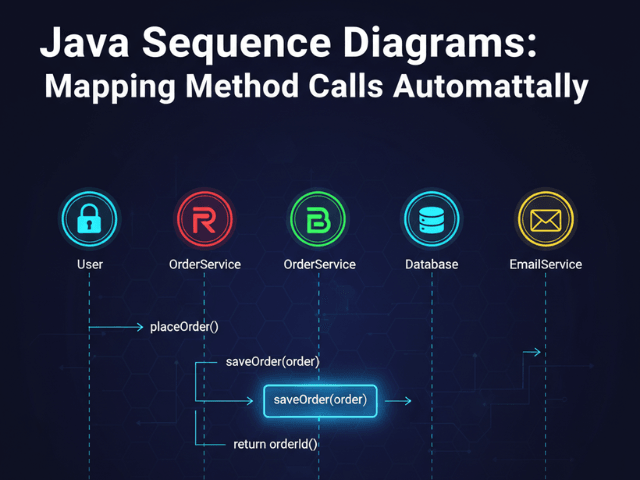
Java is the backbone of enterprise software. It powers banking systems, supply chains, and massive e-commerce platforms. But with great power comes great complexity.
In a typical Enterprise Java application a simple user action like “checkout” might trigger a chain reaction across twenty different classes. The Controller calls the Service. The Service calls a Helper. The Helper calls a Factory. The Factory calls a Repository.
Trying to follow this path by reading the code is like trying to trace a single strand of spaghetti in a bowl. You lose your place. You forget the context.
You need to see the sequence of events. You need a Sequence Diagram.
But drawing one manually for a Java stack trace is impossible. By the time you draw the third lifeline you have already forgotten what the fourth one does.
This guide explains how our java sequence diagram generator solves this. We turn your verbose Java code into a clear chronological map of execution.
Why Java Stack Traces Are Hard to Visualize
Java’s strict structure is good for the compiler but hard on the human brain when you are trying to understand flow.
The Depth of Enterprise Java Call Stacks
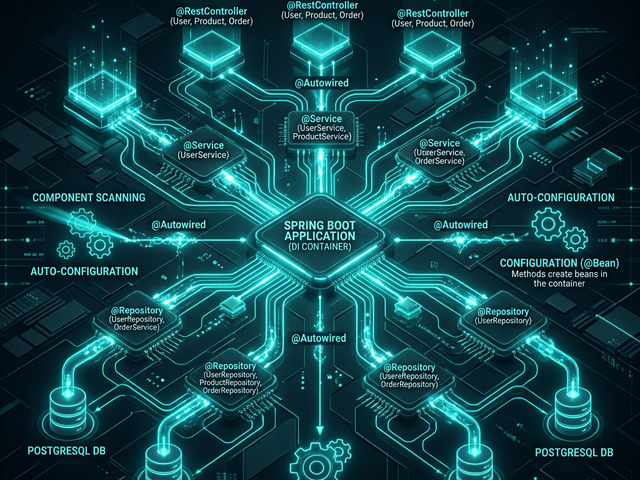
Modern Java frameworks like Spring Boot abstract a lot of the logic. Dependency Injection means you often don’t see new Service() in the code. You just see an interface being called.
This makes mental mapping difficult. You see paymentService.process(), but which implementation is running? Is it the StripePaymentService or the PayPalPaymentService? Without a visual aid you have to dig through configuration files to find the truth.
Synchronous vs. Asynchronous Complexity
It gets worse when you introduce threads. Synchronous Communication is straightforward. But if your Java code uses CompletableFuture or message queues the execution flow splits.
Trying to visualize parallel threads in your head is a recipe for a headache. You need a diagram that explicitly shows when the main thread waits and when a worker thread picks up a task. This is where visualizing asynchronous communication becomes vital.
Transforming Java Syntax into Sequence Logic
Our tool is designed to parse the semantics of Java execution.
Parsing Object.method() Calls
We scan your code snippet for method invocations. When we see userRepository.save(user) we understand that a message is being sent from the current class to the userRepository class.
We capture the method name save and the arguments user. This becomes the label on the arrow in the diagram.
Mapping Classes to Lifelines
Every object involved in the interaction gets its own lifeline.
If your code interacts with five different services our AI automatically draws five vertical lines. It arranges them in the order they are called ensuring the diagram reads naturally from left to right.
Visualizing Return Types and Void Methods
We also look at what happens after the call. If the method returns a value we draw a dashed return arrow. If the method is void we know the interaction ends there.
This visual distinction helps you spot data flow issues. You can see exactly where the data comes from and where it goes.
Workflow: From IntelliJ/Eclipse to Diagram
You don’t need to install a heavy plugin that slows down your IDE. Our text-based workflow fits right into your clipboard.
Selecting the Relevant Business Logic
Open your IDE. Navigate to the method that is causing you confusion. Maybe it is a complex OrderController endpoint.
Highlight the method body. Copy it.
Pasting into AI Diagram Maker
Switch to our tool. Paste the Java code.
You don’t need to include the imports or the package declarations. Just the logic is enough. Our AI infers the rest.
Handling Interfaces and Implementations
If you paste code that uses interfaces the AI will create a generic lifeline for that interface.
However you can use the prompt to clarify. You can type: “Assume PaymentService is the Stripe implementation.”
The AI will then update the diagram to show the specific interaction making the documentation more precise.
Scenario: Debugging a Spring Boot Controller
Let’s look at a real-world scenario. You have a bug in the login flow.
Tracing the Request from Controller to Service to Repository
You copy the login method from your AuthController.
The generated diagram shows the flow:
AuthControllerreceives the request.- It calls
AuthenticationManager. AuthenticationManagercallsUserDetailsService.UserDetailsServicecallsUserRepository.
Suddenly you see the issue. The UserRepository call is happening inside a loop. You are hitting the database N+1 times.
The code hid this inefficiency in a loop structure. The sequence diagram exposed it immediately as a wall of repetitive arrows. You have found the performance bottleneck visually. This technique is invaluable for conducting a post-mortem analysis.
Benefits of AI-Generated Java Docs
Instant Documentation for Code Reviews
When you submit a Pull Request involving a complex logic change don’t just write a text description.
Generate a sequence diagram of the new flow. Paste the image into your PR.
Your reviewers will love you. They can verify the logic instantly without having to mentally compile your changes.
Onboarding Juniors to Legacy Enterprise Beans
Legacy Java apps often use older patterns like EJBs (Enterprise JavaBeans). These are notoriously hard to learn.
By generating sequence diagrams for the core business processes you give new developers a lifeline (pun intended). They can see how the ancient machinery works without having to read thousands of lines of XML configuration and boilerplate code.
This tool turns the opaque wall of Java text into a transparent window into your application’s behavior.