· Scenarios & Use Cases · 6 min read
Turning Meeting Notes into Workflow Diagrams Instantly
Don't let great ideas die on the whiteboard. Learn how to convert raw meeting notes to diagrams instantly, turning chaotic brainstorming into polished workflows.
We have all walked out of a great meeting feeling a buzz of excitement. The brainstorming session was a huge success. Ideas were flying, you solved a complex process problem, and everyone is finally on the same page. The whiteboard is a glorious, chaotic mess of arrows, circles, and scribbled notes. Your personal notepad is just as frantic. And now comes the hard part. Someone, and that someone is probably you, has to take that creative chaos and turn it into a clean, coherent, and shareable process diagram. The energy from the meeting quickly fades as you realize you’re about to spend the next hour just drawing boxes.
Tl;dr
Don’t have time for the full read? Here it is. The worst part of a great meeting is turning your messy notes into a clean diagram. AI diagramming tools now let you skip that entire step. You can literally copy and paste your raw, unstructured meeting notes into the tool, add a simple instruction like “make a flowchart from this,” and it will instantly generate a polished and logical workflow diagram. It saves a ton of time, eliminates ambiguity, and ensures the decisions from the meeting are captured and shared immediately.
Introduction: The Post-Meeting Scramble for Clarity
That feeling I described, that scramble to formalize the output of a meeting, is such a common bottleneck. The momentum from a productive brainstorming session can be lost so quickly when it runs into the administrative chore of documentation. The valuable ideas captured on the whiteboard or in your notebook need to be translated into a format that everyone can understand and refer to later.
This article is a practical demonstration of how to solve that exact problem. It’s about how you can take a block of raw, messy text and get a professional looking diagram back in just a few seconds.
The Scenario: Nailing Down a New Customer Support Process
To make this a real world example, let’s create a sample set of meeting notes. Imagine you’re a product manager, and you just finished a meeting with the support team to map out a new process for handling customer tickets. Your notes might look something like this.
The Raw Meeting Notes (The “Before”)
They’re probably not going to be perfectly structured. They’ll be a mix of bullet points, phrases, and shorthand. Something like this:
- customer submits support ticket via web portal
- ticket gets automatically assigned to a Tier 1 agent
- the agent checks if it’s a known issue by looking in the knowledge base
- if it’s a known issue, they send the customer the link and close the ticket
- if it’s a new issue, the agent tries to resolve it. if they can, they close the ticket. if they can’t resolve it in 1 hour, they have to escalate it
- escalation means assigning the ticket to a Tier 2 engineer
- the Tier 2 engineer fixes the problem and notifies the customer, then the ticket is closed.
The AI Transformation: From Text to Flowchart
Now for the magic trick. This is the part that feels impossible but is now a reality. We are going to turn that block of text directly into a flowchart.
The Simple “Copy and Paste” Action
What’s really incredible about this is that you don’t even need to spend time cleaning up your notes or writing a detailed, structured prompt. Modern AI is smart enough to understand the intent and logic within unstructured text.
You can simply copy your notes, paste them into AIDiagramMaker, and add a very simple instruction at the beginning.
Prompt: “Create a flowchart from these notes about our new customer support process.”
- Customer submits a support ticket via web portal
- Ticket is auto-assigned to a Tier 1 agent
- Agent checks the knowledge base for known issues
- If it’s a known issue, send the KB link and close the ticket
- If it’s new, agent attempts resolution; if resolved within 1 hour, close the ticket
- If not resolved in 1 hour, escalate to a Tier 2 engineer
- Tier 2 fixes the issue, notifies the customer, and closes the ticket
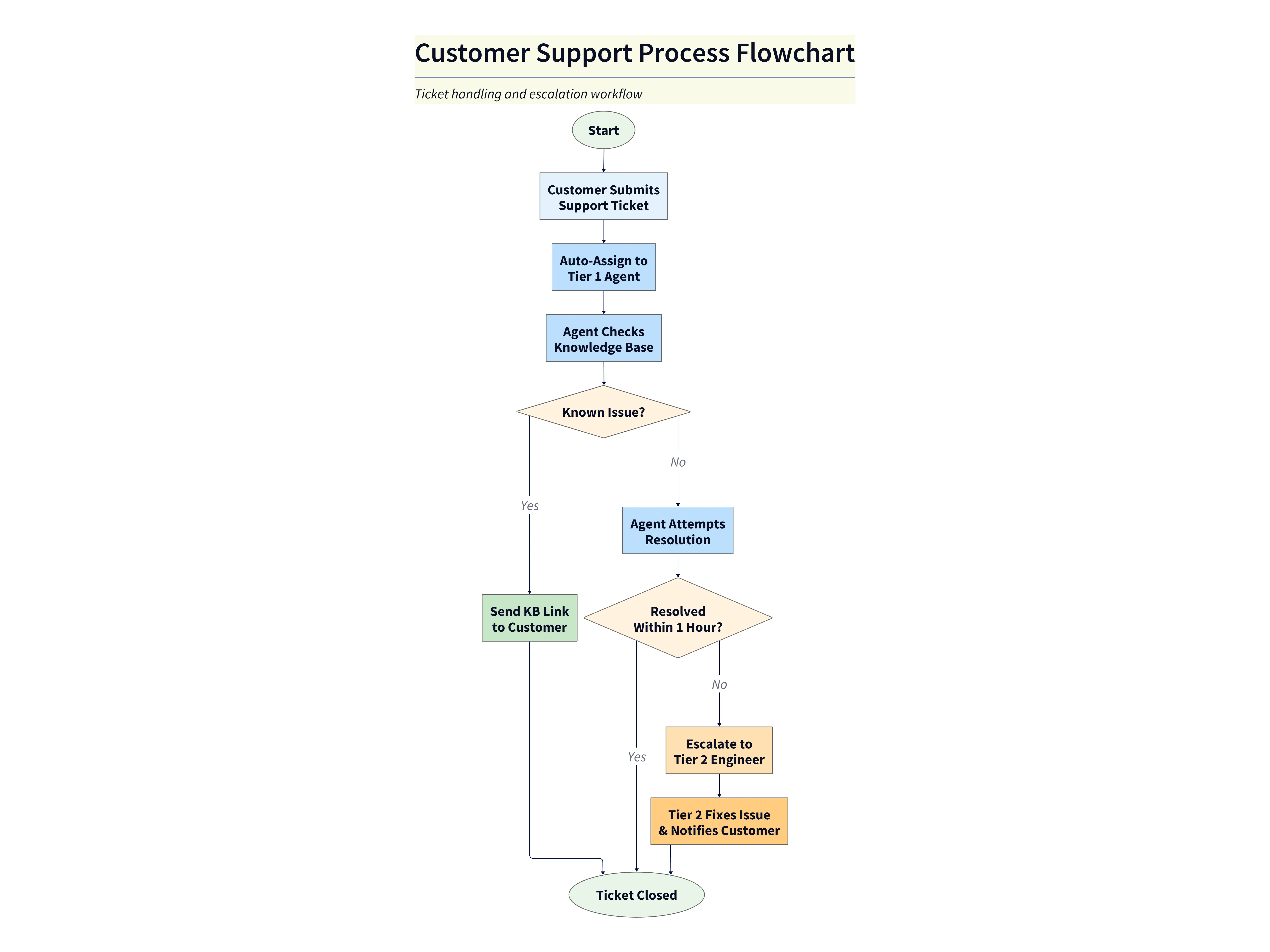
Diagram Explanation:
- The flowchart visually maps the customer support ticket process from submission to resolution.
- Decision points (like “Known Issue?” and “Resolved Within 1 Hour?”) are clearly shown, making the escalation path easy to follow.
- Each step and outcome is explicit, helping teams quickly align on the process and spot any gaps before implementation.
The Polished Diagram (The “After”)
You hit enter, and a few seconds later, a high quality flowchart appears. It’s not just a guess; the AI has correctly parsed the logic from your notes.
It will have correctly identified:
- The starting point of the process (the customer submitting a ticket).
- The decision points, those “if this, then that” moments (Is it a known issue? Can the agent resolve it?).
- The different paths and branches that result from those decisions.
- The multiple terminal endpoints where the process concludes (the ticket being closed).
A task that would have taken at least 30 to 60 minutes of tedious manual work in a traditional tool is now complete. Instantly.
Why This Workflow is Essential for Product and Business Teams
This ability to go straight from notes to a diagram is more than just a time saver. It has a few really important benefits for any team, but especially for product and business teams.
First, there’s the unprecedented speed. You can literally create and share a visual summary of the meeting’s decisions before the attendees have even gotten back to their desks. This keeps the momentum going and ensures the conversation continues.
Second, it ensures alignment. A block of text can be interpreted in different ways by different people. A visual flowchart is much less ambiguous. Everyone can look at the diagram and immediately agree, “Yes, this is the process we decided on,” or, just as importantly, “No, wait, that’s not quite right.” It surfaces misunderstandings immediately.
Third, it frees up high value time. Product managers, business analysts, and team leads should be spending their brainpower on strategy and problem solving, not on the administrative task of drawing diagrams. This workflow automates one of the most tedious parts of their job.
Finally, it provides a great foundation for better documentation. This initial, quickly generated flowchart can be the first step in creating more formal and detailed process documentation, like a BPMN chart, down the line.
Conclusion: Capture the Idea, Not Just the Words
The core idea here is a shift from simple transcription to intelligent visualization. We should stop thinking of our meeting notes as just a static record of what was said. We can now treat them as the direct input for creating a dynamic, actionable workflow.
AI diagramming turns your notes from something you file away into something you can immediately share, discuss, and act upon.
Next time you walk out of a meeting, don’t just type up your notes. Paste them into AIDiagramMaker and watch your process come to life.