· Scenarios & Use Cases · 7 min read
Converting a System Design Interview into a Diagram in Real Time
Whiteboarding is stressful. Learn how to use a system design AI diagram tool to visualize your architecture in real-time during interviews, impressing interviewers with speed and clarity.
Anyone who has been through a high stakes tech interview knows the feeling. You’re standing at a whiteboard, marker in hand, with a couple of interviewers watching you intently. They’ve just given you a deceptively simple prompt, something like “Design a URL shortener,” and now you have to talk, think, and draw all at the same time. It can be incredibly stressful. Your handwriting looks like a seismograph reading during an earthquake, and you spend half your mental energy just trying to draw a coherent looking box. What if there was a better way? What if, as you simply described your solution out loud, a perfect, clean diagram was being built on a screen right next to you?
Tl;dr
Don’t have time to read it all? Here’s the key takeaway. System design interviews are tough. Instead of fumbling with a messy whiteboard, you can use an AI diagramming tool as your real time assistant. As you talk through your architectural solution, you type simple, descriptive prompts. A clean, professional diagram builds itself on the screen, step by step. This keeps your thoughts organized, makes your explanation crystal clear, and seriously impresses your interviewers. It’s also a lifesaver for remote interviews.
Introduction: The Pressure of the Whiteboard
The whiteboard portion of a system design interview is a strange ritual, isn’t it? It’s supposed to be a window into your thought process, but for many of us, it just adds a massive layer of performance anxiety. You’re juggling multiple things at once. You have to remember all the components of a scalable system, you have to articulate your design choices clearly, and on top of all that, you have to be a part time graphic artist.
This is where a new paradigm comes in. What if you could separate the thinking and talking from the drawing? What if you could offload the task of making things look neat and tidy to an intelligent assistant? This post shows how that is now entirely possible, using a classic interview question as our example.
The Scenario: “Design a URL Shortening Service like TinyURL”
This is a favorite for a reason. It seems simple on the surface but allows for a deep discussion about databases, hashing, scalability, and API design.
A typical solution for this problem will usually involve a few key components, and the conversation will likely touch on all of them.
- A Client (like a web browser) that makes the requests.
- A Web Server or API Gateway to handle those requests.
- The actual URL Shortening Logic to generate a unique hash.
- A Database to store the mapping between the short hash and the original long URL.
- A Redirect Service to handle the read path when someone clicks a short link.
Let’s walk through how you could use an AI tool to build this out live during the conversation.
The “Verbal Whiteboarding” Workflow
The idea here is to treat the AI diagramming tool as your scribe. You’re still doing all the thinking, but the tool is handling the visualization.
Step 1: The Initial High-Level Design
You always want to start simple. As you begin explaining your initial, high level approach, you type your first prompt. You’re just laying out the biggest pieces of the puzzle.
Prompt: “Show a user’s browser making a request to a web server. The web server has a URL shortening service and connects to a database.”
In a few seconds, a simple, clean three component diagram appears on the screen. It’s not detailed, but it’s a starting point. It shows the interviewer you can think in broad strokes before diving into the weeds.
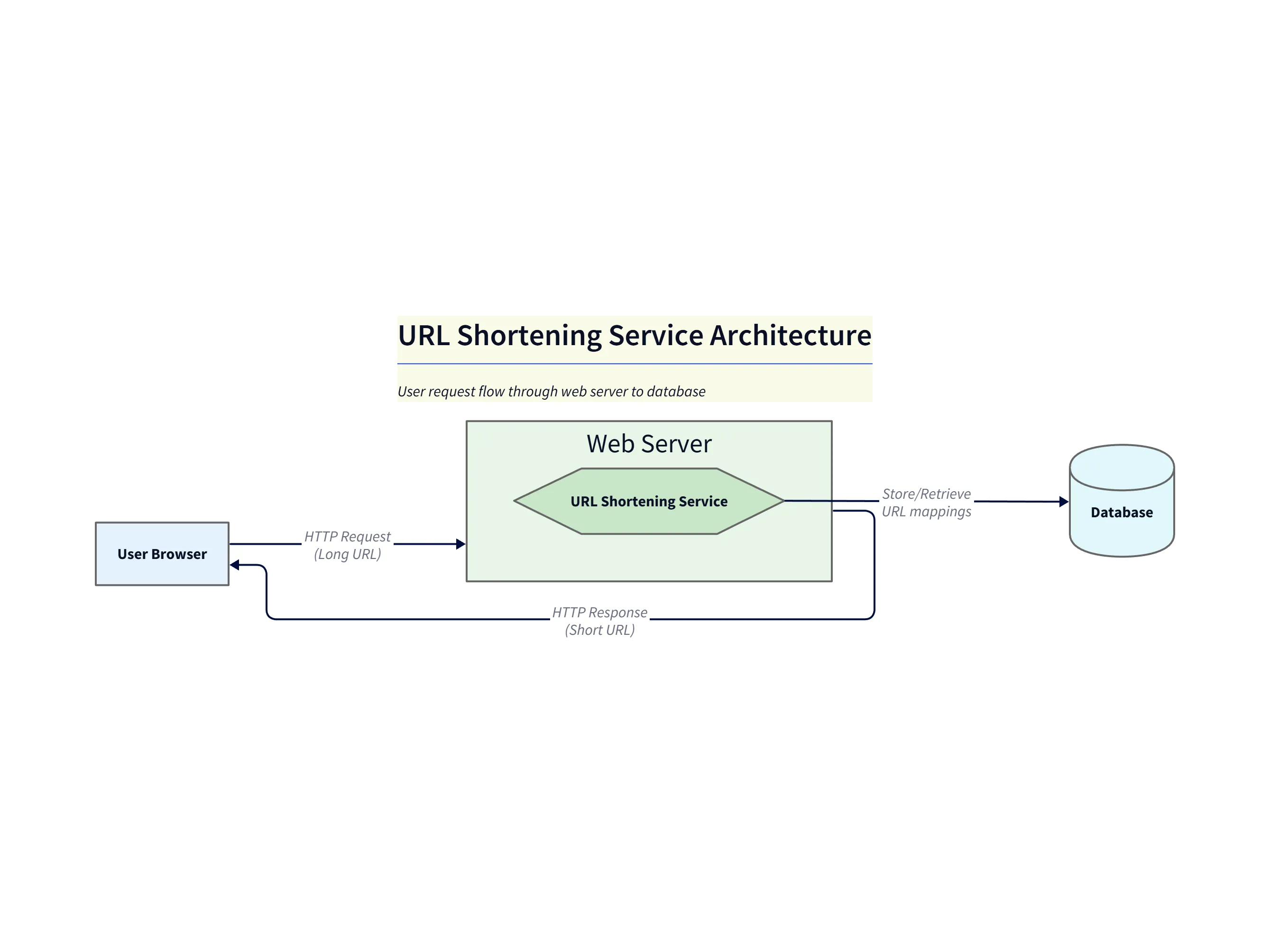
This simple view is ideal for the opening of a whiteboard explanation: introduce the actors and the major system boundaries before diving into internals.
Diagram note (high-level):
- Browser → Web Server (shorten request): The client submits a long URL to the shortening endpoint. This high-level diagram highlights the initial write request and the overall system boundary to use when opening the discussion.
Step 2: Adding Write-Path Details
The interviewer will probably ask you to elaborate. “Okay, tell me more about what happens when a user wants to create a new short URL.” As you explain the logic for the “write path,” you refine the diagram.
Follow-up Prompt: “Expand on the web server. Add a ‘Hash Generator’ component that creates a short URL. The server then writes the short URL and the long URL to a SQL database.”
The diagram instantly updates. The web server now contains a new component, and the flow is more specific. You didn’t have to erase anything. You just described the next layer of detail.
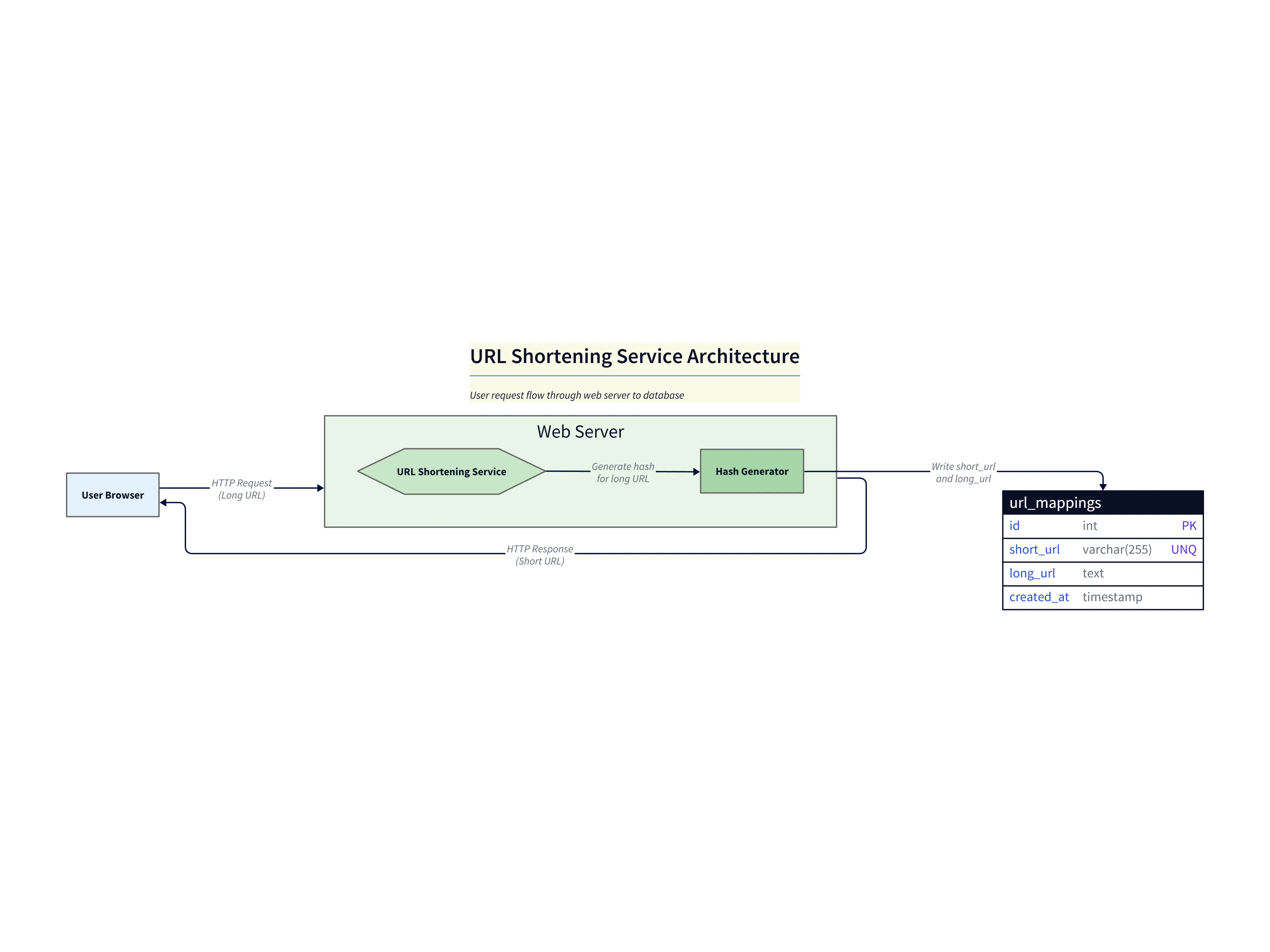
This view focuses on the write path: how the service generates a compact token, checks for collisions, and persists the mapping for future redirects.
Diagram note (write path):
- Hash Generator: The shortening service delegates to a hash generator to produce a compact token (short URL). The generated token should be checked for collisions before persisting.
- Persistence (url_mappings): The short/long mapping is stored in a database table (example schema:
id, short_url, long_url, created_at). The write path stores the mapping and returns the short URL to the user.
Step 3: Detailing the Read-Path (Redirection)
Next, the conversation will naturally shift to the “read path.” What happens when someone actually clicks on the shortened link? You explain the redirect flow, and update the diagram once more.
Follow-up Prompt: “Now, show a new flow for when a user accesses a short URL. The request hits a ‘Redirect Service’ which reads the long URL from the database and returns a 301 redirect to the user’s browser.”
The diagram now includes this second critical flow. You could even use a follow up prompt to say “Make the lines for the redirect flow a different color” to make it even clearer.
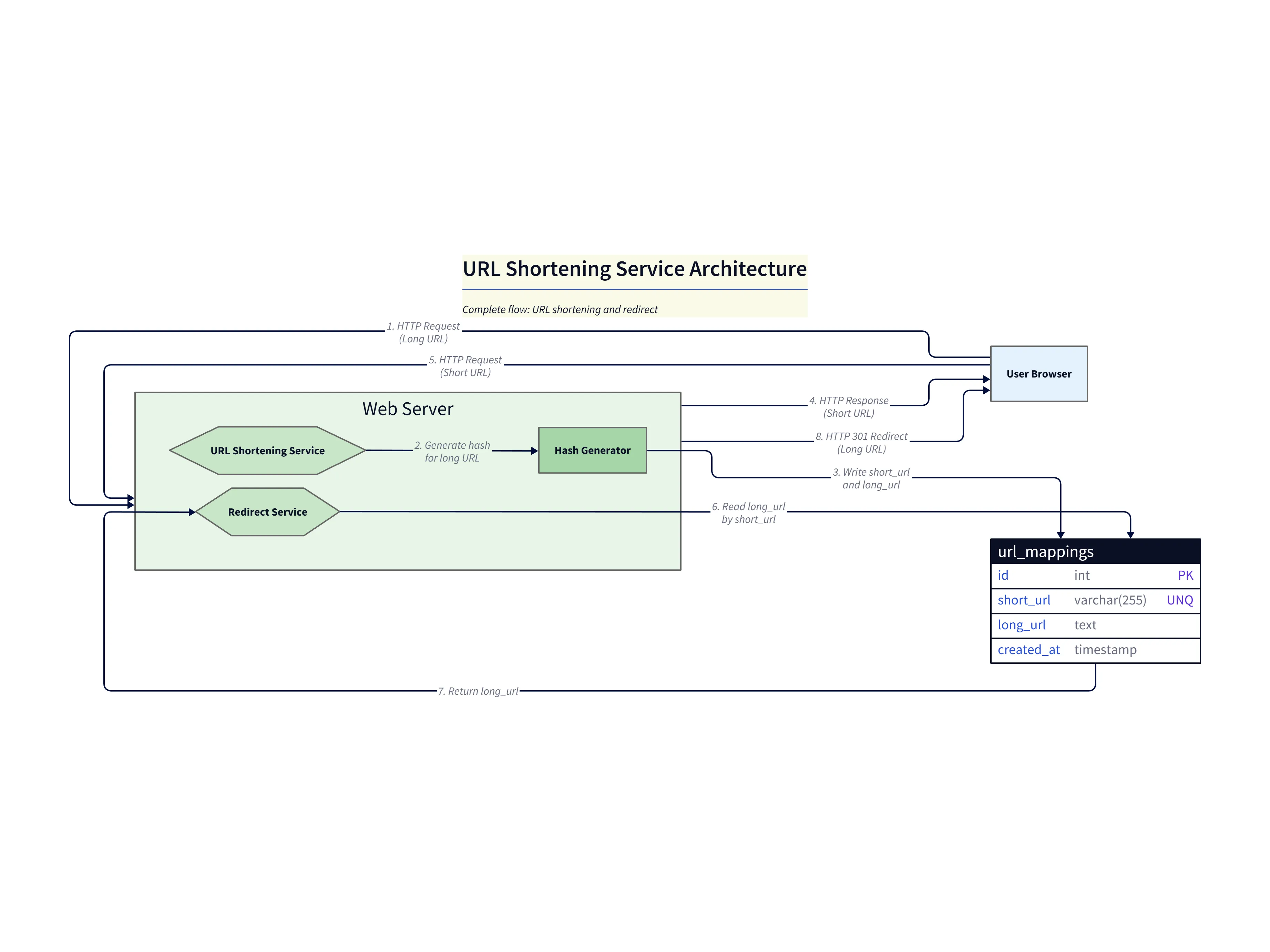
This complete diagram shows end-to-end behavior and is perfect for discussing operational considerations like caching, rate limiting, and database scaling.
Diagram note (complete flow):
- Redirect Service (read path): When a short URL is requested, the redirect service looks up the long URL by
short_urland issues an HTTP 301 redirect back to the client’s browser. - Operational concerns shown in the diagrams: Add caching for hot redirects, rate limiting on create endpoints, monitoring for collision rates, and a background job for cleanup/analytics as indicated by the complete flow diagram.
These images illustrate progressive refinement: start high level, add write-path internals, then show the full request/redirect lifecycle — exactly the pattern to use in live verbal whiteboarding.
Why This is a Game-Changer for Interviews
Using a tool like this is more than just a neat trick; it’s a strategic advantage.
First, it gives you incredible clarity and confidence. You can focus completely on explaining your design choices, knowing that the visual aid is clean, professional, and easy to read, not a messy scribble.
Second, there is the speed. You can iterate on your design much, much faster than you could by erasing and redrawing on a whiteboard. This allows you to have a deeper, more substantial conversation in the limited time you have.
Third, let’s be honest, it impresses the interviewer. It shows that you are comfortable and fluent with modern, AI powered developer tools. It shows you think about efficiency and clarity in all aspects of your work.
And finally, it is absolutely perfect for remote interviews. Trying to draw with a mouse on a digital whiteboard is a terrible experience for everyone. Sharing your screen and building a professional diagram live is a far superior solution.
Conclusion: Design with Your Mind, Not Just Your Pen
In the end, a system design interview is a test of how you think, not how well you can draw. AI diagramming tools can be a powerful ally in these high pressure situations.
They handle the tedious part of visualization, freeing up your cognitive bandwidth to focus on what really matters: designing a robust, scalable system and clearly communicating your ideas. It allows you to design with your mind, not just with your pen.
Preparing for a system design interview? Practice with AIDiagramMaker for free and turn your thoughts into diagrams instantly.