· Developer Tools · 7 min read
AI UML Class Diagram Generator: Object-Oriented Design for Architects
Stop manually drawing boxes and method names. Learn how an AI class diagram generator transforms Python and Java code or natural language descriptions into professional UML diagrams for architects and developers.
You know the feeling. A new junior developer joins your team. They are bright and eager. They ask you how the payment processing module works. You take a deep breath. You open your IDE. You start clicking through files.
“Okay so here is the PaymentProcessor interface,” you say. “And that is implemented by StripeProcessor and PayPalProcessor. But wait: they both inherit from BaseTransaction which actually injects the LoggerService. Oh and don’t forget the PaymentFactory that instantiates them.”
The junior developer nods blankly. You can see the confusion in their eyes. You are describing a complex web of relationships using words and file tabs. It is like trying to describe the layout of a city by looking at photos of individual bricks.
You need a map. You need a UML Class Diagram.
But you don’t have one. Or if you do, it is an old image file from three years ago that still references a CreditCardService that you deleted last summer. Drawing a class diagram by hand is one of the most tedious tasks in software engineering. You have to draw boxes. You have to type out every method name. You have to remember if the arrow needs a hollow triangle or a filled diamond to represent composition.
We built our ai class diagram generator because we believe architects should spend their time designing systems, not drawing boxes. This guide covers how you can generate accurate object-oriented visuals instantly.
The Challenge: Visualizing Complex Object-Oriented Structures
Object-Oriented Design (OOD) is powerful because it models real-world complexity. But that complexity is hard to keep in your head.
Why UML Class Diagrams are Essential for Software Architects
Class diagrams are the blueprint of your code. They show the static structure. They reveal the inheritance hierarchies. They expose the dependencies. For an architect, this view is critical. It allows you to spot “God Classes” that are doing too much. It allows you to see tight coupling that will make testing a nightmare. It is the only way to audit the structural integrity of your application without reading every single line of code.
The Laborious Process of Manually Drawing Classes, Attributes, and Relationships
The problem is the manual labor required to create them. To draw a proper class diagram, you have to manually analyze your code. You have to look at the file. You list the public methods. You list the private attributes. You draw the box.
Then you look at the imports to find the relationships. “Okay this imports User so I need to draw a line to the User box.” Doing this for a system with fifty classes takes days. It is mentally exhausting data entry. And because it takes so long, nobody does it until they are forced to for a compliance audit.
The Difficulty of Communicating Object-Oriented Design to New Team Members
This lack of documentation hurts your team. We cover this deeply in our onboarding juniors scenario, but the gist is simple: without visual aids, new hires have to build a mental map of the codebase from scratch. This takes weeks. They make mistakes because they don’t understand the inheritance chain. They duplicate code because they didn’t know a base class already had that helper method.
Introducing AI Diagram Maker: Your Smart AI Class Diagram Generator
We changed the workflow. Instead of drawing the class diagram, you simply provide the code or the design intent. Our AI handles the rest.
Describe Your Classes, Get a Diagram: The Power of UML Class Diagram AI
Our engine understands the syntax and semantics of object-oriented programming. You can paste a snippet of Python or Java code. The AI parses it. It identifies the class keywords, method signatures, and properties. It recognizes the extends or implements keywords.
It translates this syntax into visual components. It draws the boxes, partitions the methods and attributes, and draws the correct connector lines with the correct arrowheads.
How AI Transforms Text Descriptions into Structured Class Diagrams
You don’t even need code. You can design from scratch using natural language. You can type: “Create a class diagram for a School system. There is a Student class and a Teacher class. Both inherit from Person. A Teacher has many Courses. A Student takes many Courses.”
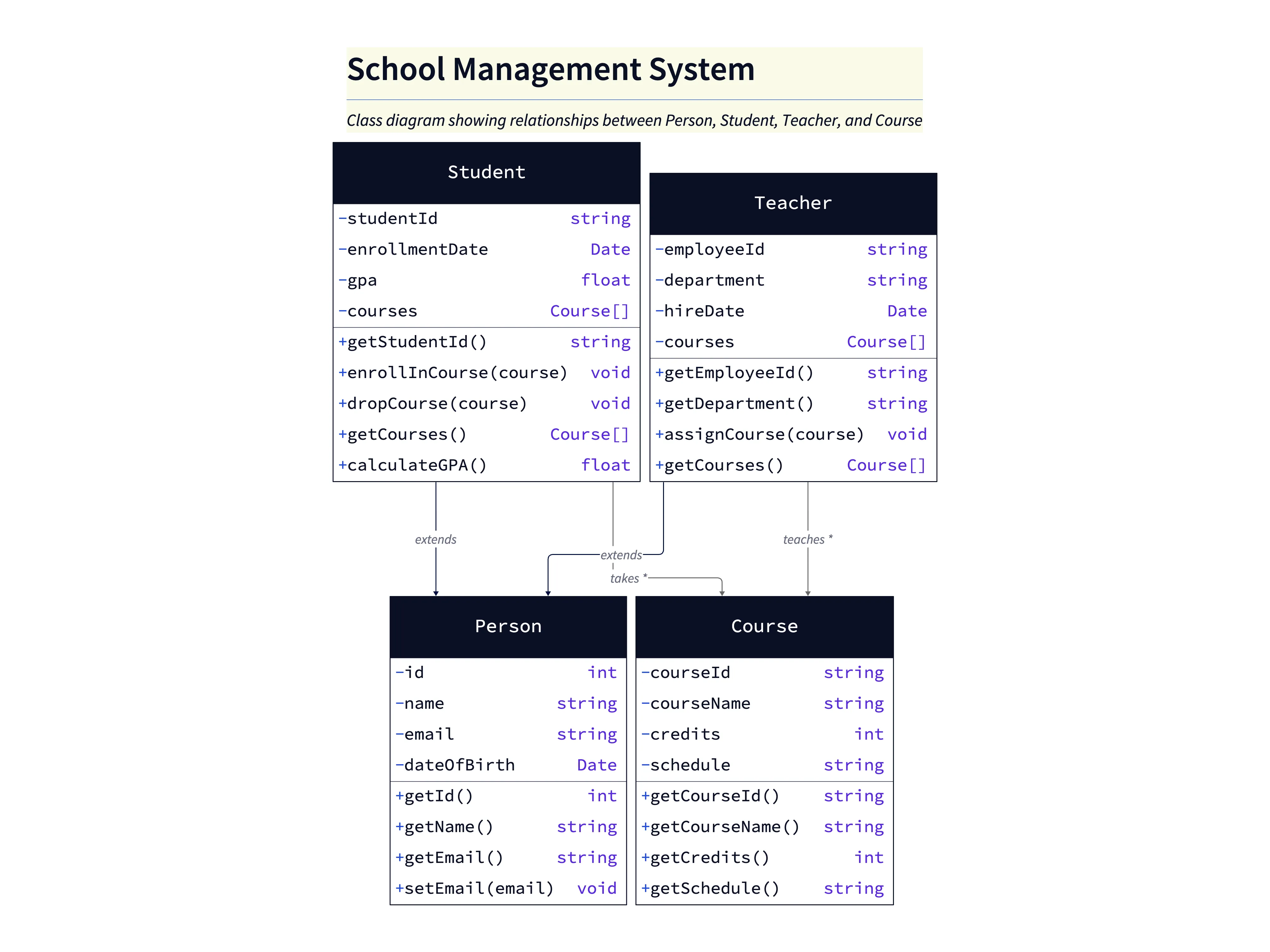
The AI parses this description. It understands that “inherits from” means a Generalization relationship. It understands that “has many” implies an Association or Aggregation. It generates a mathematically correct UML diagram from your English sentences.
Key Advantage: Bridging the Gap Between Design Intent and Visual Representation
The biggest benefit is speed. You can move from a thought to a diagram in seconds. This allows you to treat class diagrams as ephemeral sketches. You can generate one just to answer a specific question during a code review and then discard it. You don’t need to treat it like a precious artifact because creating it cost you nothing.
Real-World Use Cases for AI-Generated Class Diagrams
We see architects and lead developers using this tool to solve specific communication problems.
Onboarding Juniors with Visual Code Structures
This is the classic use case. Before you sit down with the new hire, you grab the core files of your module and paste them into AI Diagram Maker. You share the screen of the generated diagram to point out exactly where the main logic lives and how child classes inherit functionality.
Documenting API Design and Data Models
When you are designing a new feature, you often start with the data model. You can sketch out the classes in the tool: “I need an Order class. It needs a list of Items. It needs a ShippingAddress.” Seeing the diagram helps you spot flaws, such as realizing a ShippingAddress should be on the Order instead of the User, before you write any code.
Refactoring Legacy Codebases with a Clearer Structure
Refactoring spaghetti code is dangerous. You can use the tool to generate a diagram of the current messy state. This visual confirms where the coupling is tightest, helping you plan your “surgical strikes” to decouple the code safely.
Designing New Software Architectures with Precision
If you are planning a new microservice, you can define the internal class structure using the tool. It facilitates a design-first culture without the heavy lift of traditional modeling tools.
Manual UML Class Diagramming vs. AI: A Quantum Leap in Productivity
The Traditional Way
- Drag a rectangle. Type “Customer”.
- Add a separator line. Type ”+ name: String”.
- Add another separator for methods.
- Drag another rectangle for “Order”.
- Draw a line and search the menu for the “Aggregation” diamond arrowhead.
It is slow. And if you make a typo, you have to double click and edit every single element.
The AI Way
In AI Diagram Maker, you paste the code:
class Customer {
  String name;
  String email;
  void register() {}
}

class Order {
  List<Item> items;
}
You hit generate. The diagram appears instantly. The relationships are drawn automatically based on the type definitions.
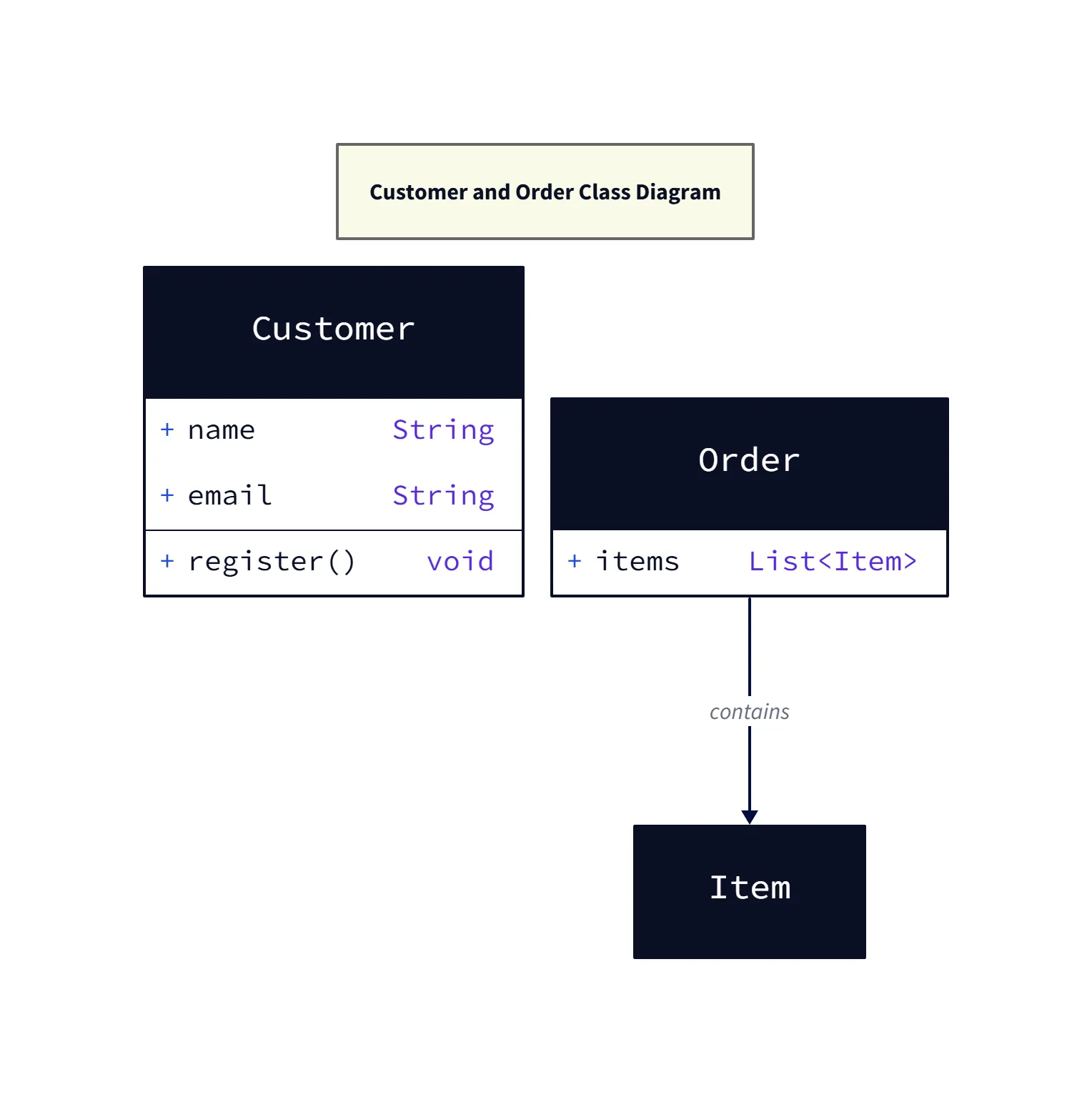
Diagram explanation:
- Classes & Members:
Customershows attributes (name,email) and aregister()method;Ordercontains a list ofItemobjects. - Relationship: The
OrdercontainsItem(aggregation/composition), illustrated by the connector labeledcontains— useful for visualizing ownership and cardinality. - When to use: This diagram is ideal for onboarding or quick design reviews where static structure matters more than behavior.
Effortless Updates: Adapting to Design Changes with a Simple Text Prompt
If you decide to add a phoneNumber to the Customer, you just add it to the text or code snippet and update the diagram. The visual updates instantly. You never have to manually resize a box to fit new text again.
Step-by-Step: Creating Your Class Diagram with AI Diagram Maker
- Defining Classes, Attributes, and Relationships in Text: You can use natural language or code. We support Java, Python, C#, and many others.
- AI Processes and Generates the Initial Class Diagram: The AI reads your input, maps the entities, and lays them out. Parent classes usually appear above child classes.
- Refining and Customizing Your Object-Oriented Design Visual: Once the diagram is generated, use the chat to tweak it. “Color the User class green” or “Remove the association between Logger and User.”
- Exporting and Sharing with Development Teams: Export your diagram and save the definition right into your project repo.
The Developer’s Guide to AI Diagramming goes deeper into the overall philosophy, but for architects, this is a liberation: you can finally stop drawing boxes and start leading your team with clear, accurate visuals.