· Architecture · 3 min read
Django Model Visualization: From models.py to ERD
This guide covers how to use a Django model visualizer to turn your code into an Entity Relationship Diagram (ERD) instantly.
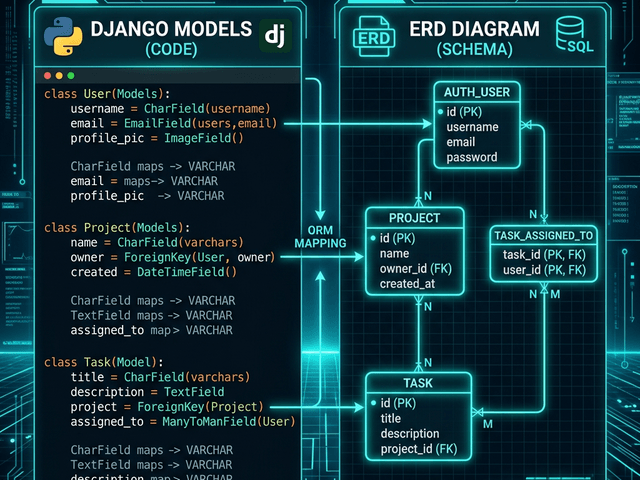
In Django your models.py file is the source of truth. It defines your database schema. It defines your business objects.
But as your project grows that file gets huge. You have 50 models. You have ForeignKeys pointing everywhere. You have ManyToManyFields creating invisible join tables.
When you need to onboard a new developer or plan a migration reading the Python code isn’t enough. You need to see the data topology.
This guide covers how to use a django model visualizer to turn your code into an Entity Relationship Diagram (ERD) instantly.
Django ORM: Code that Defines the Database
Django uses an ORM (Object-Relational Mapper). You write Python classes and Django writes the SQL.
ForeignKey, ManyToManyField, OneToOneField
These three fields define the relationships.
- A ForeignKey is a One-to-Many link.
- A OneToOneField is a strict 1:1 link.
- A ManyToManyField is complex. It implies a hidden third table.
In code these look like just another line of text. In a diagram they look like structural cables holding your app together.
Workflow: Visualizing models.py
You don’t need to install django-extensions and configure graphviz which can be a pain on some operating systems.
Copying the model classes
Just open your models.py. Select the classes. Copy them.
AI interpretation of Django-specific fields
Paste them into AI Diagram Maker. Our engine is trained on Django syntax.
It knows that author = models.ForeignKey(User) means “Draw a line from this Model to the User Model.” It ignores the max_length=255 arguments (unless you want them) and focuses on the connections.
Generating the Application ERD
The result is a clean ERD of your application.
Seeing the implicit join tables (Many-to-Many)
If you have a ManyToManyField between Student and Course the AI can visualize the implicit relationship. It shows that they are connected.
This helps you reason about performance. “Oh querying Students from Courses is going to involve a heavy join.”
verifying on_delete behaviors visually
You can ask the AI to highlight constraints. “Show me which relationships are CASCADE delete.”
Seeing a red line for cascading deletes helps you prevent data loss accidents. “If we delete a User we accidentally delete all their Orders? We should change that to SET_NULL.”
Documenting Large Django Projects
Django projects are split into “Apps” (folders).
Visualizing relationships across different Apps
The hardest relationships to track are the ones that cross app boundaries. Your Billing app imports models from your Accounts app.
This creates a “Spaghetti Import” problem.
By pasting models from both apps into the tool you can visualize the coupling. You can see if your apps are truly modular or if they are tightly coupled knots. This insight is essential for architectural refactoring.